Melonia: A Blackletter Font for Bold Campaigns
Testing Melonia in a Product Launch Graphic
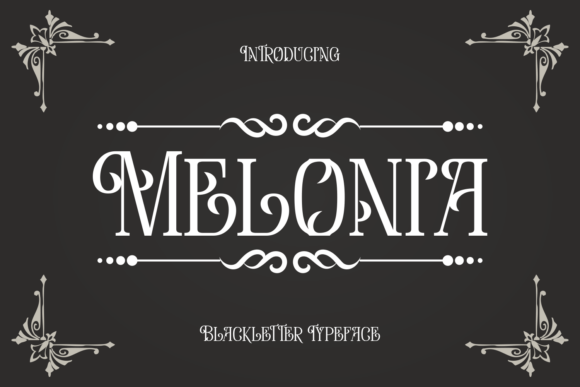
As I started sketching out the layout, I noticed how Melonia’s unique style complemented the product imagery. Its gothic roots provided a classic feel, while the modern readability made it suitable for digital platforms. I used it for the headline, “Introducing Our New Skincare Line,” and found that the font’s weight and structure allowed the message to be clear even at smaller sizes.
Readability Across Digital Platforms
One of the biggest concerns when using a blackletter font like Melonia is its legibility on different screens. I tested it across mobile previews, desktop banners, and YouTube thumbnails. On mobile, I made sure to use larger text sizes and high-contrast colors to ensure the font remained readable. The bold serifs helped maintain clarity, even when the text was scaled down.
For Instagram posts, I paired Melonia with a clean sans serif font for body copy, which created a nice balance between the decorative and the functional. This pairing worked especially well for quote graphics and promotional announcements. On Pinterest, where visuals often dominate, Melonia’s ornamental details added an extra layer of interest without overwhelming the content.
Using Melonia in Brand Campaigns
Melonia is not just a font—it’s a statement. I’ve used it in several campaign scenarios, including a seasonal sale announcement and a course launch. For the sale graphic, I placed the headline in Melonia against a dark background, using a light-colored text to make it pop. The font’s dramatic flair matched the urgency of the promotion, making the call to action more compelling.
In the course launch campaign, I used Melonia for the title and key messaging, while keeping the rest of the design minimal. This allowed the font to take center stage, reinforcing the brand’s creative and artistic identity. It worked well for branded templates and email promotions, where a strong visual presence is essential.
Font Pairing and Practical Tips
When working with Melonia, it’s important to pair it wisely. I often use a clean sans serif font like Montserrat or Lato for body text, ensuring that the overall design remains balanced. For more formal campaigns, a serif font like Georgia can provide a contrasting yet complementary look. Script fonts or handwritten styles can also work well for decorative titles or labels, but they should be used sparingly to avoid clutter.
I always check the included styles, alternates, ligatures, weights, and file formats before finalizing a design. Melonia offers a range of weights and styles, which makes it versatile for different applications. It also supports multiple languages, which is great for international campaigns. Commercial font licensing is crucial, especially when using the font in ads, templates, or branded content.
When to Use and When Not to Use Melonia
Melonia is best suited for short headlines, callouts, logo-style text, and decorative titles. It’s ideal for promotional graphics, social media banners, and web headers where a strong visual impact is needed. However, it may not be the best choice for long copy, dense information, or formal corporate communication. The ornamental details can sometimes distract from the message, especially in contexts that require simplicity and clarity.
On mobile screens and small previews, it’s important to keep text size and spacing consistent. Melonia works well on dark backgrounds, but I recommend testing it on light backgrounds too. In fast-scrolling feeds, using it for key messages rather than entire paragraphs helps maintain engagement without overwhelming the audience.
Final Thoughts on Melonia
Melonia is a powerful tool for designers looking to add a touch of elegance and creativity to their campaigns. Its blend of gothic tradition and modern readability makes it a standout choice for a variety of applications. Whether you’re designing a product launch graphic, a YouTube thumbnail, or a webinar banner, Melonia has the versatility and character to elevate your visual storytelling.
By understanding its strengths and limitations, you can use Melonia effectively to enhance brand recognition, message clarity, and audience engagement. With the right pairings and thoughtful application, this blackletter font can become a key asset in your design toolkit.